
Why Microsoft 365 Copilot Training Should Be Built Around Real Work
Aug 13, 2026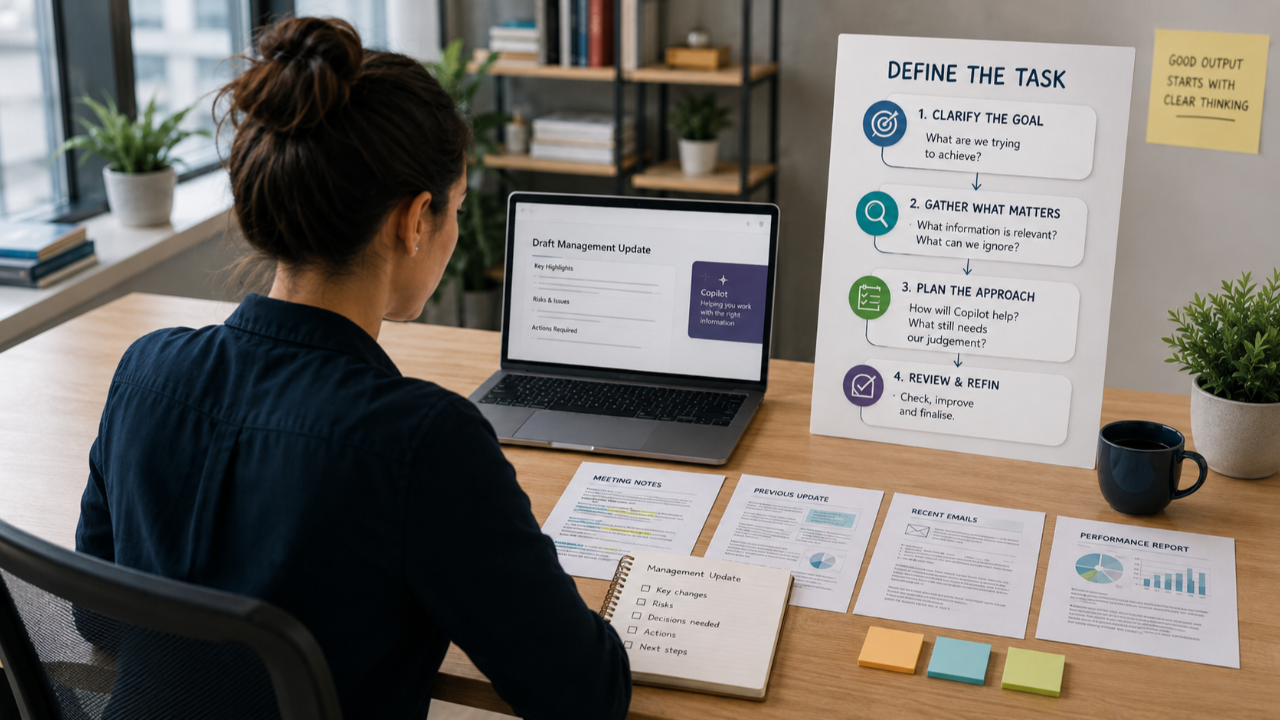
One of the patterns we regularly see when people use Microsoft 365 Copilot is that a good result can arrive surprisingly quickly.
Someone gives Copilot an instruction, receives something useful and continues working with it. They add more information, ask for another change and expand the task. For a while, everything works well.
Then the result starts to move away from what they wanted.
The instructions change. "Keep that section." "Go back to the previous version." "Don't change this part." "Use the first version, but add the information from the last one."
The person is now spending time trying to repair the output.
This happens across generative AI tools, including ChatGPT, Gemini and Claude. It becomes particularly important in Microsoft 365 Copilot because people are often using it with real emails, documents, reports, meetings and other information connected to their work.
Often, the problem started before the first prompt. The person knew what they needed to do, but they started working with Copilot before stopping to think clearly about what the task required, what information mattered and what a good result should include.
Learning how to use Copilot effectively therefore needs to go further than learning individual prompts or seeing what each feature does. People need a clear way to think through the work before they begin.
Get clear on the task before you start
Before opening Copilot, it is worth pausing and asking: What do I actually need to do to complete this task well?
Consider someone preparing a management update. They may have several meeting notes, a previous update, emails containing recent changes and a report with current figures.
They already know they need to prepare the update. What they may not have stopped to consider is what the update needs to achieve, what the audience needs to know, which information matters, what has changed, which risks or actions should be included and what needs to be checked before the update is used.
That clarity also helps them decide what information Copilot actually needs.
More information does not always produce a better result. If someone provides several documents and treats everything as equally important, Copilot has to work out where to place its attention. Background information can receive too much weight while something important receives too little.
The principle "if everything is important, nothing is important" applies well here.
Before starting, it helps to be clear about:
what the task needs to achieve
who the final work is for
what information is relevant
what information is not needed
what should receive the most attention
what Copilot should help with
what still needs human judgement or checking
Copilot can then help with different parts of the work, but the person begins with a much clearer idea of what they are trying to produce.
This is why task-based learning matters. When participants practise on recognisable work, they learn how to think through the task and how the tool fits into the steps required to complete it.
A clear way of working makes good results easier to repeat
Effective use of Copilot usually involves several steps. The exact steps change depending on the task, but the working approach remains similar.
The right approach often includes:
-
defining the task and the result required
-
identifying the information Copilot needs
-
providing the right source material and context
-
giving clear instructions
-
breaking larger work into sensible stages
-
reviewing the first result
-
questioning, correcting and improving the output
-
checking the final work before using it
This reduces the amount of trial and error.
It also helps people understand why a result was good or poor. If important information was missing, they can correct that. If the instruction was unclear, they can improve it. If the task was too large, they can divide it into smaller stages.
The result becomes easier to repeat because the person understands how they reached it.
These working skills also transfer to other generative AI tools. The interface and available features may change, but people still need to define the work, provide useful information, give clear instructions and review what the AI produces.
Learn Copilot Through the Work Teams Do Every Day
The tasks used during Copilot training should reflect the work participants actually perform rather than generic examples.
An HR team may work with policies, recruitment information, employee communications and management reports. A sales team may work with customer information, meetings, account plans and follow-ups. Marketing teams may need to research, plan, review content and prepare campaigns. Operations teams may work with reports, processes, actions and information from several sources.
This gives participants a clear reason for using Copilot.
It also allows them to understand where different parts of Microsoft 365 Copilot fit. A task may begin in Copilot Chat, involve information from Outlook, use a document in Word and finish with content that needs to be prepared for PowerPoint.
The tool is learned through the work rather than as a separate collection of features.
Participants need to do the work themselves
Demonstrations are useful because people need to see what is possible and understand how a task can be approached.
The next step is practice.
Watching someone else use Copilot shows what the trainer can do. Completing the task yourself shows whether you can apply the same approach to your own work.
At Koshima, our practical sessions use a simple structure:
Explain → Demonstrate → Exercise → Review
First, we explain the task, the required result and the Copilot capability being used. We then demonstrate how the task can be completed.
Participants complete the task themselves and review what Copilot produces. They identify what worked, what needs to change and how the result can be improved.
This review stage is important because real AI use rarely ends with the first response. Participants need experience checking information, challenging weak outputs, improving the work and deciding when the result is ready to use.
As people complete more tasks, they require less guidance. They start to recognise the same working approach in new situations and make more of the decisions themselves.
Different roles need different examples
Generic exercises are useful for introducing Copilot, particularly when a group contains people from several departments.
Deeper learning needs to become more specific.
For example:
-
HR: review information from several sources and prepare a recruitment action plan
-
Sales: prepare for a customer meeting using existing account information and recent communications
-
Marketing: review research and source material before developing campaign recommendations
-
Operations: compare reports, identify changes and prepare actions
-
Managers: bring information from several sources together into a clear update for decision-making
These tasks teach more than one prompt.
Participants have to decide what information is required, how to structure the task, what Copilot should do at each stage and how to check the final result.
They are practising the decisions they will need to make when they return to work.
More advanced Copilot features make sense when they are used for the right reasons
Once people understand how to apply Copilot to useful work, features such as Copilot Notebooks, scheduled prompts and simple agents become easier to understand.
Instead of learning a feature and then looking for somewhere to use it, people can start with the work and recognise when a particular capability could help.
For example:
-
Copilot Notebooks can help when someone needs to work with a focused collection of information over time.
-
Scheduled prompts can support work that needs to happen repeatedly.
-
Simple agents can support a clear and repeatable requirement.
The starting point for each feature should still be the work.
Once the work is clear, the reason for using the feature becomes clear too.
The result should appear in the work
The purpose of Copilot training is to help people use the tool effectively when they return to their normal work. Otherwise what was the point?
That means looking for changes such as:
-
tasks taking less time to complete
-
better use of existing Microsoft 365 information
-
clearer and more complete outputs
-
fewer repeated corrections
-
more confidence working through larger tasks
-
useful approaches being repeated across similar work
This is also why practice matters after an initial workshop. People learn something, use it at work, discover where they struggle and then improve their approach.
Over time, Copilot becomes less about trying individual prompts and more about knowing how to use AI as part of completing the task.
For organisations investing in Microsoft 365 Copilot, practical learning should help employees use it on the work that matters to them and give them a way of working they can repeat.
That is how teams begin to get high-quality work done faster and more consistently.
[Learn more about Koshima Microsoft 365 Copilot training]